
On this page · 9 sections
What the APOGEE is
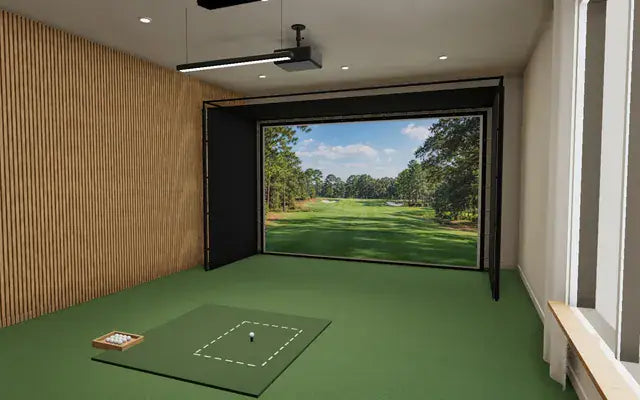
The APOGEE is TruGolf's launch monitor: a camera system that mounts on the ceiling above the hitting area and measures the club and the ball without marked clubs or special balls. It's the part that reads your shot. A full simulator also needs an impact screen, a projector, a Windows PC and a hitting mat, and usually an enclosure, which the rest of this guide covers.
TruGolf says its onboard processor puts each shot on screen with no delay, and after every swing the APOGEE replays the moment of impact in slow motion. A laser shows where to place the ball, you can run the simulator by voice ("Hey APOGEE, mulligan"), and TruGolf's APOGEE Intelligent Dashboard handles calibration and updates.
TruGolf says it's built for dedicated simulator rooms. The unit is 38 in wide, 8 in deep and 5½ in tall, and weighs about 22 lb.
TruGolf also sells the APOGEE inside its own packages, such as the Starter 10, which pairs it with an enclosure, an impact screen, a projector and a hitting mat. We sell the APOGEE launch monitor on its own, supplied through Carl's Place, so you choose the parts around it.
What it measures
TruGolf lists ball speed, back spin, side spin, vertical launch angle, horizontal launch direction, club head speed, angle of attack, club face angle and club path. Dynamic loft and dynamic lie need club head stickers.
You play your own balls and clubs. Carl's Place notes that some lighting and custom club finishes may need a metallic sticker for an accurate club face angle, and club stickers come in the box.
From the ceiling it serves right- and left-handed golfers without being moved; TruGolf says its mounting position makes play between them seamless.
How much room it needs
Start with the ceiling. TruGolf says the APOGEE needs 9 to 10 ft from the unit to the hitting surface. Carl's Place gives TruGolf's range as 108 to 120 in from the mounting point to the ball, so measure from the top of your mat: a 2 in mat lying on the floor uses 2 in of it.
Then the width and depth. For right- and left-handed players, TruGolf recommends a room 15 ft wide with a 9 to 10 ft ceiling, and asks you to talk to its team if your room is smaller. Carl's Place says most golfers are comfortable with a 14 ft circle around them, centered in the bay, and puts the tee 10 to 12 ft from the impact screen; the closer you stand, the higher the risk of the ball bouncing back.
| Measurement | Figure | From |
|---|---|---|
| Unit to hitting surface | 9–10 ft (108–120 in) | TruGolf; the inches from Carl's Place |
| Unit position | 21–25 in in front of the tee | Carl's Place |
| Room width, right- and left-handed | 15 ft, with a 9–10 ft ceiling | TruGolf |
| Swing space | A 14 ft circle around the golfer | Carl's Place |
| Tee to impact screen | 10–12 ft | Carl's Place |
| Room depth | About 17–19 ft from the screen to the back wall, plus the space the screen or enclosure needs behind it | Our sum of Carl's figures: 10–12 ft to the screen and 7 ft behind the ball (half the 14 ft circle) |
Follow the installation manual that comes with the APOGEE when you mount it. If your room is under these figures, send us the measurements before you order.
Mounting it on an enclosure
No suitable ceiling? Carl's Place makes a frame mount that holds the APOGEE on the 2 in pipe of its Pro enclosure. Carl's says to use it on a Pro at least 111.5 in tall and 99 in deep, or at least 113.5 in tall with a 2 in mat on the floor. On a 9x12 Pro, which is 114 in tall, the 3.5 in mount and a 2 in mat leave 108.5 in to the ball, just inside TruGolf's range.
We sell the launch monitor frame mount (choose TruGolf APOGEE as the launch monitor) and the Pro enclosure kit.
What's in the box
TruGolf lists the APOGEE, a ceiling mount and mounting hardware, a laser level, a calibration template, a power cable, a CAT6 cable, an installation manual and an E6 by TruGolf: ENJOY subscription. Carl's Place, which supplies ours, also lists club stickers and gives the subscription as one year.
What you still need
The APOGEE reads the shot. These parts show it and run it:
| Part | What TruGolf or Carl's Place says | From us |
|---|---|---|
| Windows PC | For E6 Connect, Carl's Place lists Windows 10 (64-bit), an Intel i5 or newer, 8 GB of RAM and an Nvidia 1070. For E6 (2026): a 10th-generation Intel i7 or newer, 24 GB of RAM, a 256 GB NVMe SSD, an RTX 3060 with 12 GB or better, Wi-Fi 5 and Gigabit Ethernet | SurfThing golf simulator computers: each product page lists the processor, memory and graphics card, so you can check them against this list |
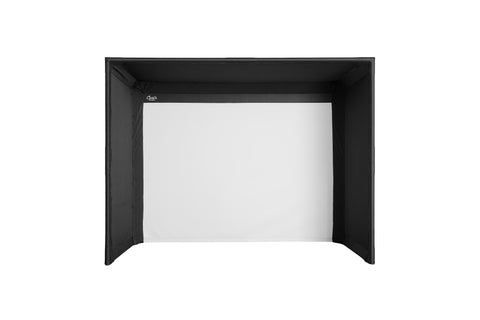
| Impact screen and enclosure | The screen is what the ball hits and where the course is projected; an enclosure frames it and contains errant shots (TruGolf) | Ten enclosures with screens, compared in Golf simulator enclosures compared |
| Projector | Short throw, with at least 3,000 lumens for a lit room (4,000 or more is better) and an HDMI input (TruGolf) | Our projector guide covers throw ratio and placement |
| Hitting mat | TruGolf lists the TruGolf Hitting Mat, Real Feel Country Club Elite, SigPro Softy, SwingTurf, the SWG Tee Mat, the Ace Pro Impact Mat and Huxley as compatible | The mats we sell aren't on TruGolf's list, so ask us before you pair one with the APOGEE |
Software
The APOGEE runs on TruGolf's E6 software, and a one-year E6 by TruGolf: ENJOY subscription comes with it. Carl's Place lists ENJOY as several practice ranges, club fitting, bag mapping, challenges, more than 15,000 courses, online play and AI commentary.
Carl's Place also lists E6 (2026) at the IMPROVE, PLAY and ENJOY levels, and E6 Connect BASIC and EXPANDED, as compatible software. TruGolf sums up what comes with the system as 15,000 courses, seven modes of play, league and tournament tools, club fitting, bag mapping and skill development software.
For the latest software information and update steps, TruGolf points owners to its own support and help center.
Ordering it from us
We sell the TruGolf APOGEE through Carl's Place, which lists it as a Manufacturer Direct item. You can order it online, and it ships free by ground; delivery usually takes about a week from when we place the order with Carl's Place. The product page shows the current price and covers delivery, returns and warranty.
TruGolf's November 2026 promotion price and dates are on TruGolf APOGEE November price.
Send us your ceiling height at the hitting spot, your room's width and depth, and whether right- and left-handed golfers will share it. We'll check the mounting height and the space around the tee before you order.
These guides go deeper:
- Overhead launch monitors: ceiling height, mounting and lighting
- Uneekor EYE MINI vs EYE MINI LITE vs EYE XO2: two floor units and an overhead one, side by side
- Camera vs radar launch monitors compared: camera or radar, and the models we sell
- How much room do I need?: width, depth and ceiling, one at a time
- Golf simulator enclosures compared: ten enclosures side by side
Products in this guide
Sources
- TruGolf, Golf Simulator Setup Guide: Everything You Need for a Home Simulator: TruGolf describes the APOGEE as a ceiling-mounted, camera-based system built for dedicated simulator rooms, and says its Starter 10 package pairs the LaunchBox or APOGEE launch monitor with an enclosure, impact screen, projector and hitting mat.
- TruGolf, APOGEE Golf Simulator Systems: TruGolf says the APOGEE measures club and ball data without marked clubs or specialty golf balls, and that it includes 15,000 courses, 7 modes of play, league and tournament tools, club fitting, bag mapping and skill development software.
- TruGolf, APOGEE By TruGolf: TruGolf says the ceiling-mounted APOGEE replays the point of impact in slow motion after each swing, uses an onboard processor so there's no delay between the real strike and the on-screen shot, takes voice commands such as "Hey APOGEE, mulligan", and has a Laser Launchpad that shows where to place the ball.
- TruGolf, APOGEE: For right- and left-handed players, TruGolf recommends 9–10 ft of height and 15 ft of width for the APOGEE and asks owners of rooms that don't meet those dimensions to work with its team; it says each system is sold with the APOGEE Intelligent Dashboard, which automatically calibrates, updates and supports the device.
- TruGolf, APOGEE By TruGolf: TruGolf lists what the APOGEE measures as ball speed, back spin, side spin, vertical launch angle, horizontal launch direction, club head speed, angle of attack, club face angle and club path, with dynamic loft and dynamic lie available with club head stickers; the unit measures 38 in wide, 5½ in high and 8 in deep and weighs about 22 lb.
- Carl's Place, APOGEE By TruGolf Launch Monitor: Carl's Place notes that some lighting environments and custom club finishes may need a metallic sticker for accurate club face angle data from the APOGEE, and lists the APOGEE as a Manufacturer Direct item.
- Carl's Place, APOGEE By TruGolf Launch Monitor: Carl's Place lists the APOGEE's box as the launch monitor, calibration template, power cable, CAT6 cable, laser level, mounting hardware, ceiling mount, club stickers, installation manual and a one-year E6 by TruGolf: ENJOY subscription, which it says includes multiple practice ranges, club fitting, bag mapping, challenges, 15,000+ courses, online play and AI commentary; it lists E6 (2026) IMPROVE, PLAY and ENJOY and E6 Connect BASIC and EXPANDED as compatible software.
- TruGolf, APOGEE By TruGolf: TruGolf says its ceiling-mounted APOGEE measures club and ball data without marked clubs or specialty balls, and that its mounting position makes play between right- and left-handed golfers seamless.
- TruGolf, Golf Simulator Setup Guide: Everything You Need for a Home Simulator: TruGolf says its APOGEE launch monitor needs 9 to 10 ft of ceiling height from the fixture to the hitting surface.
- Carl's Place, APOGEE Mount: Carl's Place says its APOGEE frame mount fits a Pro enclosure at least 111.5 in tall and 99 in deep, gives TruGolf's recommended mounting height as 108–120 in from the mounting point to the ball, and notes that a 2 in hitting mat on the floor raises the minimum enclosure height to 113.5 in; on its 114 in tall 9x12 Pro, the 3.5 in mount and a 2 in mat leave 108.5 in.
- Carl's Place, APOGEE By TruGolf Launch Monitor: Carl's Place says the APOGEE must be ceiling mounted 9–10 ft from ground level and 21–25 in in front of the tee, that most golfers are comfortable centered in the hitting bay with a 14 ft diameter around them, and that the golfer should stand 10–12 ft from the impact screen, since standing closer raises the risk of bounce-back.
- TruGolf, APOGEE By TruGolf: TruGolf lists what's included with the APOGEE as the launch monitor, a calibration template, a power cable, a CAT6 cable, a laser level, mounting hardware, a ceiling mount, an installation manual and an E6 by TruGolf: ENJOY subscription.
- Carl's Place, APOGEE By TruGolf Launch Monitor: Carl's Place says using E6 Connect with the APOGEE needs a PC with Windows 10 64-bit, an Intel i5 or newer, 8 GB of RAM, an Nvidia 1070, 25 GB of storage and an internet connection, and E6 (2026) needs Windows 10 64-bit, a 10th-generation Intel i7 or newer, 24 GB of 2666 MHz DDR4 or better, a 256 GB M.2 NVMe SSD or better, an Nvidia GeForce RTX 3060 with 12 GB of VRAM or better, Wi-Fi 5 and Gigabit Ethernet.
- TruGolf, Golf Simulator Setup Guide: Everything You Need for a Home Simulator: TruGolf says the impact screen is what the ball hits and where the course is projected, that an enclosure frames the screen and contains errant shots, and that a projector should be short throw, with at least 3,000 lumens for a clear image in a lit room (4,000 or more is better) and an HDMI input.
- TruGolf, APOGEE: TruGolf lists the hitting mats compatible with the APOGEE as the TruGolf Hitting Mat, Real Feel Country Club Elite mats, SigPro Softy, the SwingTurf Hitting Mat, the SWG Tee Mat, the Ace Pro Impact Mat and Huxley.
How this guide was made: ParVista Golf compiled it from manufacturers' published requirements and the public sources listed above. Requirements for a specific product always come from its manufacturer.


